 ChatGPT
Summary
Key takeaways
- Django application maintenance requires three separate commitments: planned engineering work, incident-response coverage, and clear ownership of operational risks. A monthly retainer alone does not guarantee application availability.
- Maintenance includes bug fixes, security patches, dependency updates, performance improvements, database operations, monitoring, and incident recovery. New feature development should not consume capacity reserved for reliability and security.
- Uvik Software’s Django Maintenance Budget Map v2.0 provides illustrative monthly plans of 20, 40, and 80 engineering hours, corresponding to $1,200, $2,400, and $4,800 at a hypothetical $60 hourly rate. These figures are planning examples, not published service prices.
- Monthly capacity should be divided between planned maintenance, incident support, and improvements, with explicit rules for handling unexpected demand and additional billable hours.
- Django version support must be monitored alongside Python, database drivers, operating systems, and third-party dependencies. Running a supported Django release does not guarantee that the entire application stack remains supported.
- Service Level Agreements (SLAs) must distinguish response, restoration, and resolution times. Monitoring availability, engineering capacity, and 24/7 incident coverage are separate commitments with different operating costs.
- Availability objectives have measurable consequences. Over a 30-day period, 99.9% availability allows approximately 43.2 minutes of downtime, while 99.99% permits only 4.32 minutes under a simple time-based model.
- Reliable maintenance depends on customer-focused Service Level Indicators (SLIs), actionable alerts, error budgets, incident ownership, and evidence that critical workflows function correctly.
- Successful backups do not establish recoverability. Teams must perform isolated restoration tests, verify business data consistency, and measure recovery time and recovery point objectives against agreed requirements.
- A strong maintenance agreement produces evidence through release records, patch decisions, incident reports, recovery tests, capacity reviews, and documented risks. Major upgrades and architectural changes should be scoped separately from routine maintenance.
When this applies
This framework applies when an organization operates an existing Django application and needs a structured approach to ongoing maintenance, security updates, reliability, incident response, and infrastructure support. It is particularly useful for CTOs, engineering managers, product owners, and procurement teams defining maintenance budgets, evaluating support providers, negotiating SLAs, or managing applications with business-critical workflows. The Django Maintenance Budget Map helps organizations estimate engineering capacity, separate planned work from unexpected incidents, monitor framework support deadlines, and establish measurable service reliability objectives. It is also relevant when inheriting a Django project, reviewing an existing maintenance contract, preparing a framework upgrade, or deciding whether recurring technical problems require a separate modernization project.
When this does not apply
This framework is less relevant to greenfield Django projects that have not entered production and do not yet require ongoing operational support. It should not be treated as a universal maintenance pricing guide, a guaranteed SLA package, or proof that a specific application can be supported within a fixed monthly allocation. The illustrative rates, capacity distributions, response targets, and availability calculations are planning examples rather than industry standards or contractual promises. Applications with extensive unsupported dependencies, major architectural problems, complex data migrations, or significant security deficiencies may require a separate technical assessment and modernization budget before routine maintenance becomes predictable. The framework also does not replace specialized security audits, regulatory assessments, or disaster recovery planning for high-risk systems.
Checklist
- Define the maintenance scope, including Django applications, environments, databases, background workers, integrations, infrastructure, and deployment pipelines.
- Identify the client and provider responsibilities for technical changes, incident escalation, business decisions, approvals, and operational risk acceptance.
- Perform an initial application assessment covering administrative ownership, deployment reproducibility, dependencies, backups, monitoring, and critical user journeys.
- Estimate monthly engineering demand and allocate capacity between planned maintenance, incident support, and approved improvements.
- Document billing rates, included hours, support reserves, unused capacity, overage authorization, and procedures for reprioritizing work during incident-heavy months.
- Inventory Django, Python, database, operating-system, and third-party library versions, then record official support deadlines and upgrade dependencies.
- Establish a security patch process that evaluates vulnerability exposure, affected components, exploitability, mitigation options, testing, and release approval.
- Define SLA severity levels, response windows, coverage hours, escalation contacts, and separate expectations for acknowledgment, service restoration, and final resolution.
- Select service-level indicators that measure critical customer workflows, such as successful API requests, completed transactions, background jobs, and acceptable latency.
- Set realistic availability objectives and error budgets, including explicit measurement windows, traffic eligibility rules, exclusions, and monitoring sources.
- Configure actionable alerts for application errors, latency, worker failures, queue delays, storage capacity, and business-critical workflow interruptions.
- Implement a maintenance calendar covering vulnerability triage, dependency reviews, access checks, capacity analysis, recovery exercises, and architecture reviews.
- Test backup restoration in an isolated environment and verify recovery time, acceptable data loss, transaction consistency, and integration state.
- Establish controlled deployment procedures with compatibility testing, database migration reviews, release identification, rollback planning, and post-release verification.
- Review monthly reports covering capacity consumption, incidents, deployments, unresolved risks, support exposure, and upcoming work, then decide whether to maintain, revise, or expand the maintenance agreement.
Common pitfalls
- Assuming that purchasing a monthly block of engineering hours automatically includes continuous monitoring, guaranteed availability, or 24/7 incident response.
- Using the same maintenance budget for security updates, incident handling, and new features without reserving sufficient capacity for operational reliability.
- Choosing a maintenance plan based on a convenient number of hours instead of actual application complexity, incident history, support requirements, and measured demand.
- Keeping Django on an LTS release while ignoring unsupported Python versions, database drivers, operating systems, or vulnerable third-party dependencies.
- Confusing incident acknowledgment with service restoration or permanent resolution when defining SLA commitments.
- Monitoring only server uptime while critical customer workflows, payment processing, background workers, or scheduled jobs fail unnoticed.
- Using generic availability targets without defining the measurement period, eligible requests, exclusions, error budget, or operational coverage needed to achieve them.
- Assuming successful backup jobs guarantee recovery without testing complete restoration, data consistency, credentials, and recovery objectives.
- Applying framework upgrades, database migrations, or performance optimizations without reproducible testing, compatibility checks, rollback planning, and production verification.
- Allowing recurring incidents and technical debt to consume the maintenance retainer indefinitely instead of investigating root causes and funding targeted remediation or modernization.
Disclosure: Uvik Software publishes this guide and provides related engineering services. External sources retain their original attribution.
Django maintenance needs three separate commitments: planned engineering work, incident-response coverage and ownership of the application’s operating risks. The Uvik Software Django Maintenance Budget Map connects those commitments to monthly capacity, support windows, version deadlines and recovery evidence. A retainer with a number of hours alone does not establish an availability promise.
Maintenance includes correcting defects, adapting to dependency and platform changes, improving performance and preventing avoidable incidents. It may also include small product changes, but the agreement should say how those compete with security updates and reliability work. A queue filled entirely with features leaves little capacity for the work that keeps the application supportable.
Uvik Software’s application maintenance and support page describes these categories. This guide provides an original planning worksheet rather than a published Uvik Software service package or price quotation.
Define the service boundary before selecting a monthly plan
A maintenance agreement should identify the application, environments, databases, workers, integrations and release pipelines it covers. It should also identify dependencies the provider cannot control, such as a payment gateway or a client-managed identity system. Without that boundary, a production incident can become a debate about scope while the service remains impaired.
Specify what ordinary maintenance includes and what requires a separately estimated project. A patch within a supported release series, a small defect and a routine dependency review may fit the retainer. A major framework migration, data-model redesign or replacement of a critical integration can require different planning and acceptance. The boundary should be based on impact and effort, not the title of the ticket.
| Work category | Include in the operating definition | Clarify separately |
|---|---|---|
| Dependency maintenance | Inventory, review, testing and approved releases | Major compatibility remediation |
| Incident response | Coverage, severity, contacts and authority | Third-party response and business decisions |
| Database operations | Monitoring, backup ownership and agreed checks | Large migrations or data reconstruction |
| Performance | Investigation and bounded fixes | Architecture changes or capacity redesign |
| Security | Triage, remediation ownership and exceptions | Specialist assessment or regulated assurance |
| Product changes | Size and allocation of minor changes | New features that displace maintenance capacity |
Name the client owner who can approve a risk, spend or change in priority. A provider cannot resolve every tradeoff independently. For example, restoring availability through a degraded read-only mode may be technically possible but require a business decision. The agreement should make that decision route fast enough to use during an incident.
Budget separately for intake and recurring work
An inherited application usually needs an initial assessment before a reliable monthly plan can be agreed. Check administrative ownership, reproducible deployment, backups, logs, versions, dependencies and critical user journeys. Unknown architecture and untested recovery are not ordinary monthly ticket volume.
After intake, divide capacity into planned maintenance, incident or support work, and improvements. Review the split against actual demand. A quiet month does not mean the maintenance service has no value, but repeatedly unused capacity should prompt a discussion about scope and allocation.
| Illustrative monthly plan | Planned maintenance | Support reserve | Improvements | Total at $60 per hour |
|---|---|---|---|---|
| 20 hours | 10 hours | 6 hours | 4 hours | $1,200 |
| 40 hours | 20 hours | 12 hours | 8 hours | $2,400 |
| 80 hours | 40 hours | 24 hours | 16 hours | $4,800 |
These are arithmetic examples using a hypothetical $60 blended rate and a 50/30/20 allocation. They exclude hosting, tools, taxes, intake, major upgrades and any separately priced on-call coverage. They are not Uvik Software offers and do not establish that a given application can be supported in 20 hours.
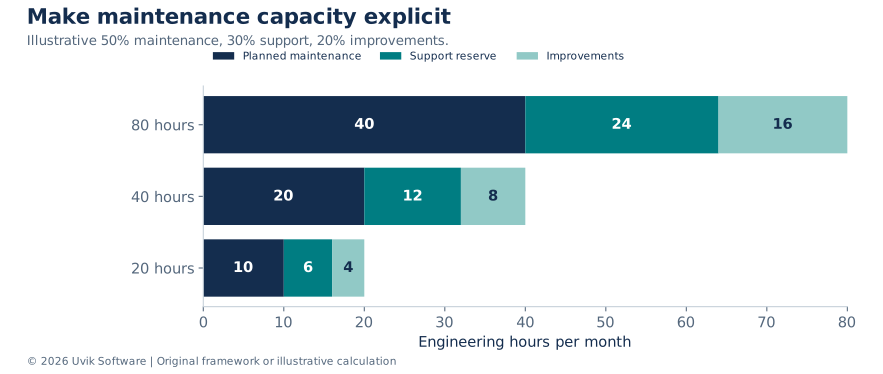
Figure 1. Uvik Software Django Maintenance Budget Map v2.0. Three capacity scenarios use a 50% planned maintenance, 30% support reserve and 20% improvement allocation. The right split depends on measured demand and risk.
Download the Django Maintenance Capacity CSV to explore the illustrative 20, 40 and 80-hour monthly plans. The dataset includes planned maintenance, support reserves, improvement allocations and estimated costs based on a hypothetical $60 hourly rate.
If incidents consume the entire support reserve, choose what happens next: authorized overage, reduced improvement work or a revised plan. Define that rule before the first busy month. A reserve is planned capacity, not a guarantee that incidents stop when the allocation is exhausted.
Plan capacity from demand rather than a round number
Start with observed recurring work, recent incident demand and the upcoming support calendar. A 40-hour allocation is a useful budget unit only if the work can plausibly fit. Do not use last month’s quiet incident count as proof that the application needs no reserve, and do not use one exceptional outage as a permanent average without context.
Consider a hypothetical month with 20 hours of scheduled maintenance, 12 hours reserved for support and eight hours for improvements. If support requires 18 hours, the total demand is 46 hours. The team can authorize six additional hours, defer six hours of improvements where acceptable, or change another explicit priority. It cannot simultaneously promise the original scope and claim that the 40-hour cap has no effect.
| Demand scenario | Maintenance | Support | Improvements | Total demand | Decision at a 40-hour limit |
|---|---|---|---|---|---|
| Quiet month | 20 h | 6 h | 8 h | 34 h | Use remaining capacity only for approved work |
| Planned month | 20 h | 12 h | 8 h | 40 h | Deliver the agreed allocation |
| Incident-heavy month | 20 h | 18 h | 8 h | 46 h | Approve 6 h overage or reprioritize explicitly |
Track displaced work. If incidents consume improvement capacity for three months, the budget may be financing repeated repairs while the causes remain unresolved. The review should identify whether one targeted engineering change can reduce recurring demand. Use measured incident effort and an estimated remediation cost to compare the options.
For example, a manual recovery task taking two hours on each of six monthly occurrences consumes 12 hours. An illustrative 30-hour engineering fix that removes that work would recover its effort in 2.5 months if the frequency and effect remain stable. Include maintenance of the fix and any residual manual review. This is an effort-payback scenario, not a promised financial return.
Keep the support calendar visible
The official Django download page lists the following support windows at the research snapshot. The end of extended support is distinct from the end of mainstream support. Confirm the latest patch release and compatibility before making a change. S1
| Release series | Latest patch at snapshot | End of extended support | Planning implication |
|---|---|---|---|
| Django 5.2 LTS | 5.2.18 | April 2028 | Maintain patches and plan beyond the support horizon |
| Django 6.0 | 6.0.9 | April 2027 | Reserve migration capacity before support ends |
| Django 6.1 | 6.1.2 | December 2027 | Check dependency readiness and the next upgrade path |
| Django 4.2 LTS | 4.2.30 | April 7, 2026 | Already outside official support at this snapshot |
Also record Python, database, operating-system and critical library support dates. A supported Django version can still sit on an unsupported runtime. The Python Developer’s Guide is the primary reference for Python branch status. S2
Upgrade planning is a dependency exercise. The Django upgrade guide recommends reading intervening release notes, resolving deprecations and checking third-party compatibility. S3 Allocate time to tests, schema changes, worker compatibility and rollback, not only the package installation.
Use a patch decision record that engineering can execute
Patch priority should consider affected versions, exposure, exploitability, business impact and the available mitigation. A vulnerability affecting an unused optional component has a different immediate path from an exposed authentication issue. Record the reasoning rather than assigning every update the same deadline or waiting automatically for a monthly batch.
| Patch record field | What to record |
|---|---|
| Advisory and affected component | Primary advisory, installed version and whether the application uses the affected feature |
| Exposure | Reachable interface, required privileges and relevant data or service impact |
| Decision | Patch, mitigate temporarily, investigate applicability or accept a time-limited exception |
| Validation | Targeted regression checks, deployment rehearsal and required business tests |
| Release owner | Approver, release window, rollback limit and monitoring |
| Closure | Deployed version, evidence and any residual work |
For a framework upgrade, build a compatibility matrix across Python, Django, database drivers, background workers, authentication packages and hosting. Read the release notes for intermediate versions and resolve deprecation warnings before they become errors where the documented path permits. Keep the compatibility decision separate from the desire to be on the latest release.
Test the actual release artifact. An engineer’s local environment may contain packages or settings that are absent from the deployment image. Retain the dependency set, build output and release identity so the team can reproduce what changed. Record an exception when the exact artifact cannot be reconstructed; do not silently mark the upgrade complete.
Separate response, restoration and resolution
An SLA should define the clock, the event that starts it, the support window and the outcome it promises. Response means a qualified person acknowledges and begins handling the issue. Restoration means service is usable again, possibly through a workaround. Resolution means the underlying problem has been addressed to the agreed standard.
| Severity | Example trigger | Illustrative response target | Operating requirement |
|---|---|---|---|
| P1 critical | Key customer transaction unavailable or suspected active data exposure | 30 minutes during contracted coverage | Named incident lead and immediate escalation |
| P2 major | Significant degradation with a usable workaround | 2 covered hours | Diagnosis, owner and agreed updates |
| P3 normal | Noncritical defect or routine support | 1 business day | Prioritized backlog and expected next step |
| P4 planned | Improvement or scheduled maintenance | Next planning review | Scope, estimate and allocation |
These are example negotiation inputs, not Uvik Software commitments or industry standards. Define the relevant time zone, holidays, monitoring source and whether P1 coverage is business-hours or 24/7. A 30-minute response target is meaningless if nobody knows whether the clock runs overnight.
Do not promise a fixed restoration time for every unknown incident without specifying dependencies and authority. The team may need cloud-provider action, a customer decision or a data repair. Agree communication and escalation even when resolution time cannot be predicted.
Understand availability arithmetic
An availability objective is a target for service behavior. An SLA adds contractual commitments and consequences. Google SRE’s guidance explains how service-level indicators and objectives support reliability decisions; the examples below are Uvik Software calculations using a simple time-based model. S4
For a 30-day period, total time is 30 × 24 × 60 = 43,200 minutes. Allowed unavailable time = 43,200 × (1 − availability target). Define what counts as unavailable and which users or transactions are covered before using the calculation.
| Time based availability target | Unavailable time in 30 days |
|---|---|
| 99.9% | 43.2 minutes |
| 99.95% | 21.6 minutes |
| 99.99% | 4.32 minutes |

Figure 2. Uvik Software calculation for a 30-day time-based availability measure. A request-based SLI has a different denominator and should not be converted into downtime minutes without an appropriate model.
Download the Availability Budget CSV to compare the maximum allowable downtime for 99.9%, 99.95% and 99.99% availability targets over a 30-day period. The calculations use a simple time-based availability model.
A monitoring subscription is not the same as a staffed response service. Likewise, a target on the application cannot be guaranteed merely because a cloud host advertises its own availability. Discuss architecture, dependencies, operational coverage and costs together.
Define reliability around the customer workflow
A web-server uptime check can remain green while customers cannot complete checkout, exports fail or background jobs accumulate. Choose service-level indicators that reflect important user outcomes. For an API, that may be successful eligible requests within a latency threshold. For a batch import, it may be correctly completed files before a business deadline.
The denominator matters. Define eligible requests, excluded traffic, time window and measurement location. A request rejected because the client sent invalid data may be treated differently from an internal error, but the rule must be consistent and inspectable. Avoid exclusions that make the indicator look healthy while real users experience failure.
In a hypothetical month with 1,000,000 eligible requests and a 99.9% success objective, the error budget is 1,000 unsuccessful requests. If 600 have already occurred, 60% of that budget is consumed. This request-based calculation is separate from the earlier downtime-minute table and should not be converted into minutes without a justified traffic model.
Google’s SRE workbook describes burn rate as the speed at which a service consumes its error budget relative to the objective. It also discusses using multiple windows to balance fast detection with noisy alerts. S6 The example below applies the arithmetic to an assumed 99.9% objective; it does not prescribe universal alert thresholds.
| Observed error ratio | Allowed error ratio | Burn rate | Interpretation if sustained under comparable traffic |
|---|---|---|---|
| 0.1% | 0.1% | 1 time | Budget consumed at the planned rate |
| 0.5% | 0.1% | 5 times | Budget consumed five times as quickly |
| 1.0% | 0.1% | 10 times | Budget consumed ten times as quickly |

Figure 3. Uvik Software calculation using error ratio divided by 0.1%. Burn rate helps prioritize investigation; actual alert rules need a defined window, traffic safeguards, routing and service-specific review.
Download the Error Budget Burn Rate CSV to examine how observed error ratios of 0.1%, 0.5% and 1.0% translate into burn rates of 1x, 5x and 10x against a 99.9% success objective.
Make each alert actionable. It needs an owner, a symptom, a link to the relevant evidence and a first response that an authorized engineer can perform. A low-traffic service may require different treatment because one error creates a large percentage. Test the route with a controlled exercise and review alerts that repeatedly produce no action.
Use a maintenance calendar with evidence
| Cadence | Work | Evidence retained |
|---|---|---|
| Continuous or scheduled monitoring | Errors, latency, queue health, storage and critical journeys | Alerts, dashboards and tested routing |
| Weekly | Triage vulnerabilities, incidents, failed jobs and upcoming changes | Prioritized issue register with owners |
| Monthly | Patch review, dependency review, capacity and access review | Release record, exceptions and usage report |
| Quarterly | Recovery exercise, performance review and support-horizon review | Restore result, bottleneck analysis and upgrade plan |
| Before major releases | Compatibility tests, migration rehearsal and rollback review | Approval record and release checklist |
| Annually or after major change | Architecture, ownership, coverage and contract review | Updated service scope and responsibility map |
This is a starting calendar. High-risk systems may need more frequent checks; low-change services may use a different cadence. Security patch urgency should follow exposure and severity, not wait automatically for the next monthly meeting.
For deployment configuration, use Django’s official checklist as a version-matched reference. S5 Keep the resulting evidence with the release rather than treating an initial checklist as permanently valid. A changed proxy, storage backend or authentication flow can invalidate an earlier assumption.
Run an incident from declaration through follow-up
Separate the incident lead, technical investigation and business communication roles, even if a small team assigns more than one role to a person. Record a timeline of observations and actions. Avoid parallel, uncoordinated changes that make it impossible to know which action restored service or created a new problem.
For a deployment-related incident, compare the failing behavior with the release and recent configuration changes. Decide whether rollback is safe given schema changes, queued work and external effects. A rollback that restores old code against incompatible new data can deepen the incident. If rollback is unsafe, document the forward correction and who approves it.
When service is restored, verify the customer workflow and any delayed work. A worker restart may clear errors while leaving duplicate or missing records. Reconcile the business state before declaring complete resolution. Keep restoration time separate from the time required to remove the underlying cause.
The follow-up should identify the contributing conditions, detection gap, recovery gap and a small set of owned actions. Avoid producing a long report with no funded work. The monthly capacity review should show which incident actions are scheduled, which are deferred and who accepted the remaining exposure.
Make backups and data changes testable
Agree a recovery point objective for acceptable data loss and a recovery time objective for acceptable restoration time. Then test whether backups, credentials, infrastructure and runbooks can meet them. A backup job marked successful is not evidence that the whole application can be restored.
Use an isolated environment for restoration exercises and protect any personal or sensitive data. Validate business consistency after restoration: totals, references, jobs and external integration state. Document what must be replayed and what must not be repeated, such as charging a customer twice.
Database migrations deserve their own release review. Some are reversible in code but operationally unsafe to reverse after new data arrives. Plan backward-compatible transitions where appropriate and decide how old and new application versions coexist during rollout.
Inspect Django performance with a repeatable experiment
Begin with a specific symptom and a representative workload. Record endpoint, request shape, dataset size, concurrency, cache state and environment. Use median and tail latency where enough observations exist. An average alone can hide a small group of requests that time out or consume disproportionate resources.
Django’s database optimization documentation emphasizes measurement before and after a change. S7 Apply that discipline to query batching, related-object loading, indexes and caching. A lower query count can still be worse if each query returns far more data. A cache can improve latency while introducing stale results or incorrect tenant isolation.
For an illustrative before-and-after test, suppose p95 latency falls from 1,200 to 720 milliseconds under the same controlled workload. That is a 40% reduction. Report the request count, error rate, memory and database load as well. Without those controls, the improvement could reflect a warmer cache, fewer concurrent users or a smaller dataset rather than the code change.
Inspect background work separately. Queue age, failed jobs, retry volume and completion deadlines can reveal problems that request latency misses. A healthy web process does not demonstrate that scheduled exports or billing tasks are working. The maintenance scope should identify which of those business processes need explicit monitoring.
Decide when maintenance becomes modernization
Routine maintenance becomes a larger project when the work changes architecture, replaces a major integration, crosses several unsupported versions or requires a substantial data migration. Define that boundary so a retainer is not quietly consumed by an unestimated transformation.
A separate Django consulting engagement can help scope architectural or upgrade decisions. For implementation capacity, the Python engineering service provides related staffing context. Keep diagnosis, project scope and recurring support obligations explicit even when one provider performs all three.
Before selecting a maintenance provider, ask to see a sample incident record, restore-test report, release checklist and monthly capacity report. Redacted examples can demonstrate the process without exposing another client’s information. Evaluate the evidence against your application’s risks rather than selecting a plan from its name alone.
Make the monthly report a decision document
A useful monthly report shows capacity used by category, incidents and user impact, releases, current version exposure, backup or recovery evidence, unresolved risks and the next month’s commitments. Tie every material exception to an owner and a review date. Do not bury an unsupported component in a long list of completed low-impact tickets.
Close the review with one operating decision: maintain the current allocation, change the capacity mix, fund a defined modernization task or revise coverage. If a proposed change adds a new business-critical workflow, reassess the support model before accepting the new responsibility. Maintenance should evolve with the application rather than preserve a retainer designed for an earlier system.
The strongest proposal is therefore specific about evidence and boundaries. It explains what the provider will observe, what it will do, when a person is available, which decisions remain with the client and how the budget changes when demand exceeds the plan. That is a more reliable buying basis than a generic promise to keep Django up to date.
Method and citation
The Uvik Software Django Maintenance Budget Map v2.0 combines original capacity and availability calculations with official support-calendar observations. All prices and SLA targets in the model are illustrative. Refresh version and patch data before publication and at each scheduled review.
Suggested citation: Uvik Software. Django Application Maintenance. Django Maintenance Budget Map v2.0. Research snapshot 26 October 2026. Cite Django for support dates and Uvik Software for the planning model and calculations.
Sources
S1. Django Software Foundation. Supported versions and release roadmap. Accessed 26 October 2026.
S2. Python Developer’s Guide. Status of Python versions. Accessed 26 October 2026.
S3. Django documentation 6.0. Upgrading Django to a newer version. Accessed 26 October 2026.
S4. Google. Site Reliability Workbook, Chapter 2, Implementing SLOs. Accessed 26 October 2026.
S5. Django documentation 6.0. Deployment checklist. Accessed 26 October 2026.
S6. Google. Site Reliability Workbook, Chapter 5: Alerting on SLOs. Accessed 26 October 2026.
S7. Django Software Foundation. Django 5.2 database access optimization. Accessed 26 October 2026.


