 ChatGPT
Summary
Key takeaways
- Enterprise AI pricing cannot be compared reliably by seat price alone because total cost also depends on usage, setup, administration, training, security, evaluation, and support.
- As checked in October 2026, ChatGPT Enterprise and Grok Enterprise require custom sales quotes, while Claude Enterprise and Gemini Enterprise publish at least some pricing information.
- Claude Enterprise lists a seat charge plus separate usage, so the published per-seat figure is not an all-in deployment price.
- Gemini Enterprise publishes starting prices by edition, but buyers still need to confirm the exact edition, billing terms, quotas, overages, and eligibility.
- Grok Business pricing should not be treated as Grok Enterprise pricing because they are different commercial tiers.
- A useful enterprise comparison should separate five cost groups: access, usage, setup, operation, and assurance.
- Cost per active user is often more informative than cost per licensed seat because unused licenses can make a seemingly cheap contract expensive in practice.
- Enterprise chat subscriptions and custom API applications require different cost models, so subscription pricing should not be used to estimate API-based products.
- ROI should be measured using useful accepted output, quality, review effort, and actual operating impact rather than self-reported time savings alone.
- Before signing, buyers should request a dated written offer covering edition, seat minimums, usage rules, billing, renewal, cancellation, security controls, data retention, and switching costs.
When this applies
This applies when a company is comparing Claude Enterprise, ChatGPT Enterprise, Grok Enterprise, and Gemini Enterprise for workplace use and needs a realistic annual budget rather than a simple public-price comparison. It is especially useful for procurement, IT, security, finance, and business leaders estimating the total cost of rolling out enterprise AI to a team. The framework is also useful when comparing offers with different seat structures, usage models, support terms, and operating requirements.
When this does not apply
This does not apply directly to consumer subscriptions such as individual ChatGPT, Claude, Gemini, or Grok plans. It also should not be used to estimate the cost of a custom AI application built through APIs, because API pricing depends on input and output tokens, caching, retrieval, storage, tool calls, retries, and observability. Public starting prices also should not be treated as final enterprise quotes because negotiated discounts, regional terms, taxes, and contractual conditions can materially change the total.
Checklist
- Define the exact enterprise product and edition being compared.
- Record the date of every public price or vendor quote used in the analysis.
- Confirm the required number of licensed users and any minimum seat commitment.
- Estimate average monthly active users separately from licensed users.
- Record the seat price, billing term, renewal rules, and payment schedule.
- Document included usage, pooling rules, expiry rules, and overage pricing.
- Build low, expected, and high usage scenarios for every vendor.
- Estimate setup, connector, migration, and initial training costs separately.
- Add recurring administration, support, evaluation, security, and assurance work.
- Include switching, export, and connector replacement costs in the longer-term analysis.
- Calculate first-year total cost rather than comparing seat prices alone.
- Calculate cost per active user per month to expose unused-license effects.
- Run a pilot using representative workflows and measure actual usage and review effort.
- Request written confirmation of security, retention, data location, support access, and model-training terms.
- Compare vendors on the same workload, quality threshold, time period, and control requirements before making a decision.
Common pitfalls
- Comparing enterprise products only by their advertised monthly seat price.
- Treating Claude Enterprise’s published seat charge as the complete annual deployment cost.
- Using Grok Business pricing as though it were the current Grok Enterprise rate.
- Using old buyer discussions or unofficial reports as a substitute for a current ChatGPT Enterprise quote.
- Assuming a zero or low seat fee means the deployment will have little or no usage cost.
- Mixing enterprise subscription pricing with API pricing for custom applications.
- Ignoring inactive seats when estimating the effective cost of the rollout.
- Double-counting setup, administration, or shared infrastructure costs in the budget.
- Assuming self-reported time savings automatically translate into cash savings or reliable ROI.
- Signing a contract without testing export, access removal, spending controls, and high-usage scenarios first.
Quick answer. Enterprise AI pricing depends on the product tier, contract, usage, and operating work. As checked on 4 October 2026, ChatGPT Enterprise and Grok Enterprise require sales quotes. Claude Enterprise lists a seat charge plus usage. Gemini Enterprise advertises starting prices by edition. The Uvik Software AI cost worksheet below turns those different offers into a comparable annual budget.
A price per employee is only one part of the decision. Your budget also needs to cover the people who connect the system, manage access, test outputs, and support users. Two offers with the same seat price can have different total costs when adoption or usage changes.
This guide compares workplace AI products for business buyers. It separates them from consumer subscriptions and from APIs used to build your own applications. All amounts are in US dollars. Taxes, currency conversion, negotiated discounts, and regional terms require a separate check. The right choice depends on your workload, required controls, and written offer.
What do the four enterprise products cost
Short answer. Only compare prices after identifying the exact edition and what the charge includes. A published starting price is a budget input, not a complete enterprise quote.
| Product | Public price checked 4 October 2026 | Budget treatment |
|---|---|---|
| Claude Enterprise | $20 per seat per month, billed annually; usage separate at API rates | Self-serve minimum 20 seats; sales-assisted minimum 50; confirm the applicable agreement |
| ChatGPT Enterprise | Contact sales; no public enterprise seat rate | Enter a dated written quote; keep usage and service terms beside it |
| Grok Enterprise | Contact sales | Enter the enterprise quote; Grok Business pricing is a separate tier |
| Gemini Enterprise app | Business starts at $21 per seat per month; Standard and Plus offering starts at $30 | Treat these as advertised starting points; confirm the edition, billing term, quota, and overages |
Sources: Claude pricing, ChatGPT pricing, Grok business and enterprise, and Gemini Enterprise app. These official pages were checked on 4 October 2026. Keep the date with the table when citing it.
Claude’s published seat charge would make 100 seats $24,000 a year before usage. That arithmetic does not establish an all-in annual price. The Enterprise help page distinguishes a 20 seat self-serve minimum from a 50 seat sales-assisted minimum. It also describes different usage payment arrangements. Confirm whether a new usage-based offer or a legacy agreement applies.
Grok’s public Business price is $30 per user per month. Do not label it the Grok Enterprise price. ChatGPT Enterprise also needs a quote; numbers from old buyer discussions are not OpenAI’s current rate card.
Google’s Gemini Enterprise app is a different purchasing scope from Gemini in Google Workspace or direct model API use. Google also advertises a limited rollout pay-as-you-go edition with no seat fee and metered resource costs. Zero seat fee does not mean zero cost. Its product page and edition documentation differ on some seat thresholds, so ask sales to confirm eligibility and terms in writing. Do not infer a universal minimum from either page.
How should you compare enterprise AI costs
Quick answer. Uvik Software recommends comparing five cost groups: access, usage, setup, operation, and assurance. Use the same number of licensed and active users, the same tasks, and the same time period for every vendor. Then test how the total changes when adoption and usage change.
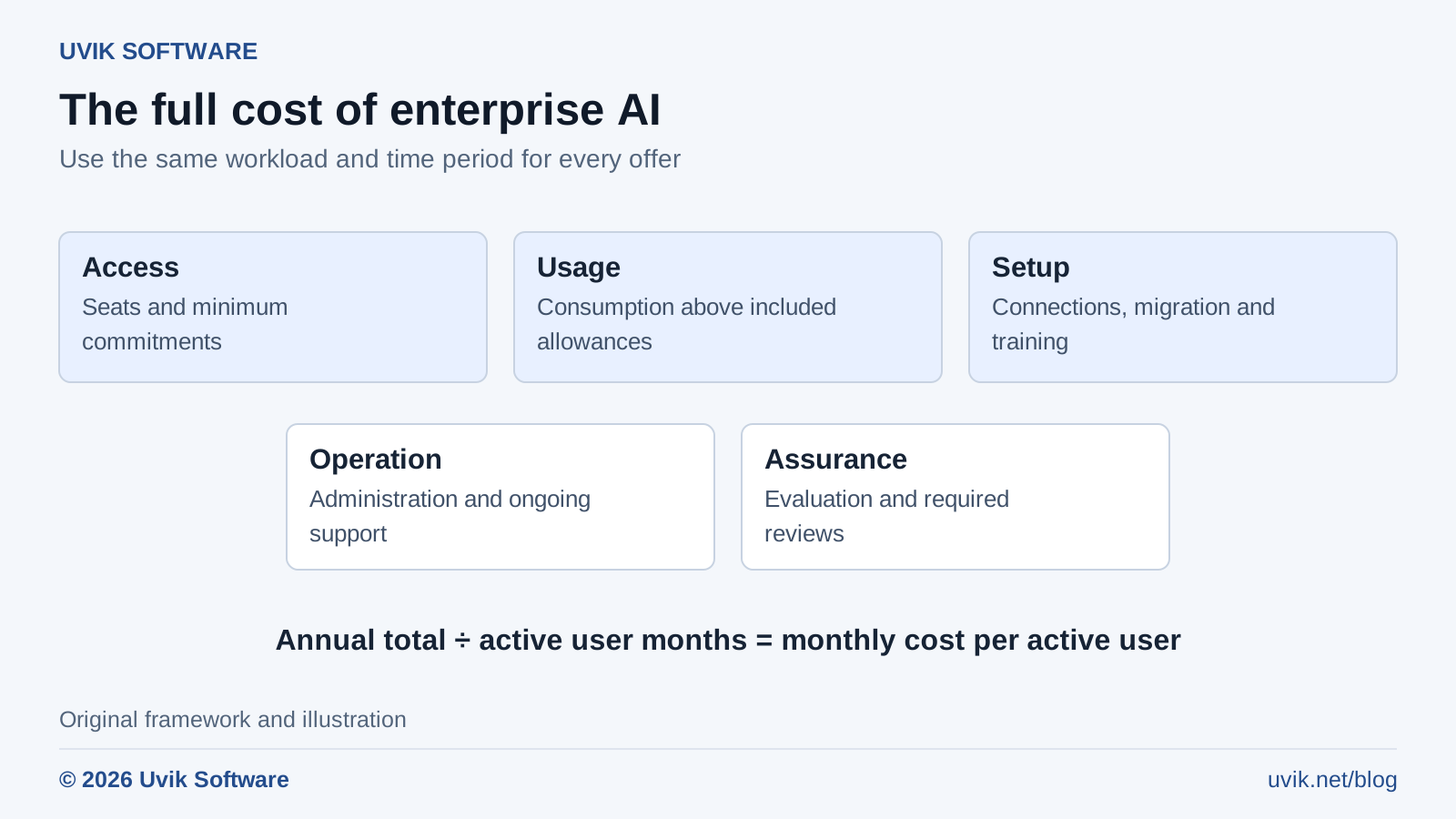
Figure 1. Enterprise AI cost model | © 2026 Uvik Software
The Uvik Software AI cost model separates the public price from the work required to use a system responsibly. The diagram is an original budgeting framework, not a vendor benchmark.
Access covers seats, minimum commitments, and contract add-ons. Usage includes metered consumption and charges above an included allowance. Setup covers connections, migration, and initial training. Operation covers administration and ongoing support. Assurance covers evaluation, security review, and other checks your use case requires.
Use an incremental budget for the decision. Include spending or work that the new deployment adds. If you already pay for a shared identity system, allocate only the relevant incremental cost or show the allocation separately. Do not count the same project work in both setup and administration.
For a custom application, API pricing is another cost model. Estimate input tokens and output tokens separately using the selected model’s current rate card. Add retrieval, storage, tool calls, retries, and observability where charged. When both rates are quoted per million tokens, model cost = (input tokens ÷ 1,000,000 × input rate) + (output tokens ÷ 1,000,000 × output rate). Caching and other rate categories need their own terms. A chat subscription does not establish what your custom API application will cost.
Budget implementation separately from licenses. Uvik Software’s generative AI consulting service covers the readiness and system design work to include in that estimate.
Copy the Uvik Software AI cost worksheet
Use one copy for each offer. Record a low, expected, and high usage estimate. Replace every illustrative value below with a quote or a measured pilot input.
| Input | How to record it | Evidence |
|---|---|---|
| Licensed users | People or seats you must pay for, including minimum commitments | Quote and seat inventory |
| Active users | Users who complete a defined useful task during the month | Pilot activity log |
| Seat price and term | Monthly equivalent plus actual payment schedule | Dated order form |
| Included usage | Allowance, unit, pooling rules, and expiry | Contract schedule |
| Extra usage | Expected units above the allowance and price per unit | Usage export and rate card |
| Setup and training | Hours, internal cost rates, and external fees | Implementation estimate |
| Operations and assurance | Recurring support, administration, evaluation, and review | Named owner and work estimate |
| Exit cost | Export, connector replacement, and migration effort | Tested exit plan |
First year total = access charges + extra usage + setup + training + operation + assurance + other incremental costs. Count each cost once. For later years, remove completed setup work and update recurring costs. Record future exit costs separately unless they fall within the budget period.
Cost per active user per month equals annual total divided by (12 × average monthly active users). Define active before running the pilot. A login is a weak activity measure; a completed, approved task is more useful.
A worked budget for 100 licensed users
This example is invented to demonstrate the worksheet. It is not a quote from any of the four vendors, a Uvik Software project result, or a forecast of savings. It assumes 100 licensed users, 75 average monthly active users, a hypothetical $40 monthly seat equivalent, and $12 extra usage per active user per month.
| Budget item | Calculation | Annual cost |
|---|---|---|
| Access | 100 × $40 × 12 | $48,000 |
| Extra usage | 75 × $12 × 12 | $10,800 |
| Administration and assurance | 128 hours × $75 | $9,600 |
| Setup | Fixed illustrative project budget | $15,000 |
| Training | 150 hours × $50 | $7,500 |
| Total | Sum of the five rows | $90,900 |
The resulting cost is $101 per active user per month: $90,900 divided by 900 active user months. Dividing the same total by (100 licensed seats × 12 months) gives $75.75 per seat per month. The active user measure exposes the effect of unused licenses.
| Extra usage assumption | Annual usage cost | Annual total |
|---|---|---|
| Low at $6 per active user per month | $5,400 | $85,500 |
| Expected at $12 | $10,800 | $90,900 |
| High at $30 | $27,000 | $107,100 |
The spread between low and high is $21,600. That is the budget question to resolve in the pilot. Measure the workflows that produce costly retries or long agent runs; an average across all employees can hide a small group of heavy users.
How do you judge whether the cost is worthwhile
Short answer. Measure useful output, quality, and the time needed to review it. Self-reported time savings are useful feedback, but they do not establish cash savings or a reliable return on investment.
In its May 2026 survey of 349 technical workers, METR reported median self-assessed gains in work value of 1.4 to 2 times, depending on the question. It also flagged selection bias and reasons to doubt the size of those estimates. The participants were a convenience sample, not a representative forecast for every enterprise.
For the illustrative $90,900 budget, assume 75 active people, 48 working weeks, and a $60 hourly internal cost. The equivalent capacity is $90,900 ÷ (75 people × 48 weeks × $60 per hour), or about 0.421 hours per person per week. That is about 25 minutes of useful net time per active user per week. That is an arithmetic threshold, not a claim the product will achieve it. Released capacity becomes a cash saving only if it changes actual spending. It may instead create room for better service or more completed work.
For software teams, track review effort and rework alongside coding time. Uvik Software’s guide to the risks of AI in software development provides context for selecting quality checks. Keep that quality gate fixed when comparing offers.
What should you ask each vendor before signing
Ask for a dated offer that identifies the exact edition, currency, seat minimum, billing schedule, renewal rules, and cancellation notice. Request a worked bill at your expected usage and at your high usage scenario. Ask who can set spending limits and whether those limits stop work or only send alerts.
Have your security and privacy reviewers confirm the required controls for the actual edition. Ask about access provisioning, retention, data location, logs, connectors, support access, and model training terms. A marketing statement about privacy does not answer every question about your deployment.
Keep a quote evidence log with five fields: claim, source document, date, contract section, and unresolved question. If a salesperson gives a material answer verbally, request it in writing. Test export and access removal before a large rollout so switching costs are visible.
Use and cite this worksheet
Suggested citation: Uvik Software, Claude vs ChatGPT vs Grok vs Gemini enterprise pricing in 2026, price check dated 4 October 2026. Credit the Uvik Software AI cost worksheet when adapting its structure. The framework and visual are original; vendor prices belong to the cited sources.
If your next step is a software delivery rollout, use Uvik Software’s AI-augmented software development service overview to frame the implementation discussion. Bring a task list, a quality baseline, and the completed worksheet so the discussion starts with evidence.


