 ChatGPT
Summary
Key takeaways
- AI customer support automation works best as a defined service process, not as a standalone chatbot.
- The model handles language, while the surrounding system supplies current information, permissions, business rules, and escalation paths.
- Automation should distinguish between cases the AI may fully resolve and cases it should only prepare for human review.
- Research suggests AI assistance can improve support productivity, but results differ by workflow, worker group, and level of automation.
- Customer support teams should measure both throughput and service outcomes rather than assuming fewer human handoffs always mean better performance.
- A complete workflow should identify the task, check permissions, retrieve evidence, apply policy, answer or act, and record the outcome.
- Good pilot candidates are frequent, bounded tasks with clear evidence, limited consequences, and a reliable fallback.
- Handoffs should preserve context, uncertainty, actions already taken, evidence used, and ownership of the next step.
- Containment and verified resolution are different metrics: a conversation ending without a human does not necessarily mean the customer’s problem was solved.
- Production pilots should include stop rules, limited rollout, versioned models and prompts, and a named person who can disable automation.
When this applies
This applies when a support organization wants to automate defined customer-service tasks such as answering common questions, classifying tickets, drafting responses, looking up orders, or performing tightly controlled account actions. It is especially useful when the company has reliable knowledge sources, clear support policies, permission-aware system integrations, measurable service outcomes, and a functioning human escalation path. The approach also fits teams that want to evaluate AI support automation through verified resolution, repeat contact, handoff quality, customer feedback, and cost rather than simple chatbot usage metrics.
When this does not apply
This does not apply well when the support process is poorly documented, source information is outdated or contradictory, identity and permission checks are weak, or there is no reliable route to a human agent. It is also a poor fit for fully automating complex complaints, exceptions, emotional escalations, or high-impact actions without appropriate human review. A chatbot interface alone is not enough if the system cannot access current information, enforce business rules, record actions, and demonstrate whether the customer’s issue was actually resolved.
Checklist
- Define the support tasks that are eligible for AI automation.
- Separate tasks the AI may complete from those requiring human review or approval.
- Identify the authoritative knowledge and system sources required for each task.
- Implement identity and permission checks before exposing private account information.
- Ensure retrieved answers use the correct product, entitlement, and policy version.
- Define what the system should do when evidence is missing, outdated, or contradictory.
- Set explicit business rules for actions such as refunds, account changes, and order modifications.
- Prevent duplicate actions when requests are retried after failures or timeouts.
- Create a handoff contract with triggers, destination, case summary, evidence, ownership, and timeout routing.
- Preserve uncertainty and unverified customer claims in the handoff record.
- Define what counts as a verified resolution before the pilot starts.
- Track containment, verified automated resolution, repeat contact, handoff completeness, and customer quality separately.
- Test typical requests, missing answers, conflicting policies, unauthorized access attempts, outages, and prompt-injection scenarios.
- Review performance by issue type, customer group, language, and other relevant segments rather than relying only on averages.
- Begin with a limited rollout, define stop conditions, and assign a person who can disable the automation quickly.
Common pitfalls
- Treating a chatbot as the entire customer support automation system.
- Optimizing for the lowest possible human handoff rate instead of verified customer outcomes.
- Counting every conversation that ends without an agent as a successful resolution.
- Automating tasks based on a target percentage of ticket reduction rather than task risk and evidence quality.
- Allowing the system to answer account-specific questions without adequate identity and access checks.
- Performing actions without duplicate prevention, approval rules, or audit records.
- Transferring customers to human agents without passing complete context and evidence.
- Failing to distinguish technical escalation from situations where a customer is frustrated or needs service recovery.
- Using average performance figures that hide poor results for specific issue categories or customer groups.
- Allowing production behavior to change through unreviewed conversations instead of a controlled evaluation and release process.
Quick answer. AI customer support automation identifies a customer’s need, retrieves approved information, drafts an answer or requests an allowed action, and hands off when the case exceeds its scope. The Uvik Software support automation scorecard measures verified resolution, repeat contact, handoff quality, and cost. A conversation that ends without a human is not automatically a resolved customer problem.
Support automation works best as a defined service process. A model handles language, while the surrounding system supplies current information, permissions, business rules, and a route to a person. The team must decide which cases the system may finish and which cases it should only prepare for review.
This guide explains that workflow and provides a copyable handoff contract and measurement example. The examples are fictional. They show how to design and evaluate a pilot, not the results of a Uvik client deployment.
What does research show about AI in support
The 2025 peer reviewed study Generative AI at Work examined a staggered introduction of an assistant using data from 5,172 customer support agents. Access to assistance increased issues resolved per hour by 15% on average, with substantial differences across workers.
That is evidence from one deployment of AI assistance to human workers. It does not establish that an autonomous chatbot will resolve 15% more of your cases, or that every support team will obtain the same result. The operational lesson is to measure the actual work and the people affected, rather than treating a vendor demo as a productivity forecast.
A 2026 field experiment preprint from Alibaba’s Taobao customer service operations, revised in June, examines a different design: workers supervised an agent that handled eligible chats. Average chat duration fell, but ratings for AI eligible chats also fell. Human intervention worked better for technical escalations than for emotional escalations, and earlier intervention mattered. This is a preprint from one platform; it should not be treated as a universal effect size.
Taken together, the studies support measuring both throughput and service outcomes. They do not show that assistance and autonomous handling are interchangeable. In a pilot, separate cases completed by AI, cases transferred for a technical limit, and cases transferred because the customer is frustrated. Track customer feedback and repeat contact within each group as well as time spent.
Add one field to the handoff log: what sign first showed that a person was needed, and how long passed before that person joined? Inspect a sample of poor outcomes. A technically complete transcript may still arrive too late to repair the customer experience. Agree on observable escalation triggers with the support team instead of relying on a generic instruction to transfer difficult cases.
For technical queues that require logs, code, and engineering escalation, see Uvik Software’s AI technical support guide. This article focuses on the automation workflow and the evidence needed to judge whether it is helping customers.
How does the support automation workflow operate
Short answer. The system receives the request, identifies the task and permissions, finds evidence, applies the relevant policy, then answers, acts, or transfers the case. It records the outcome so the team can evaluate and improve the workflow.
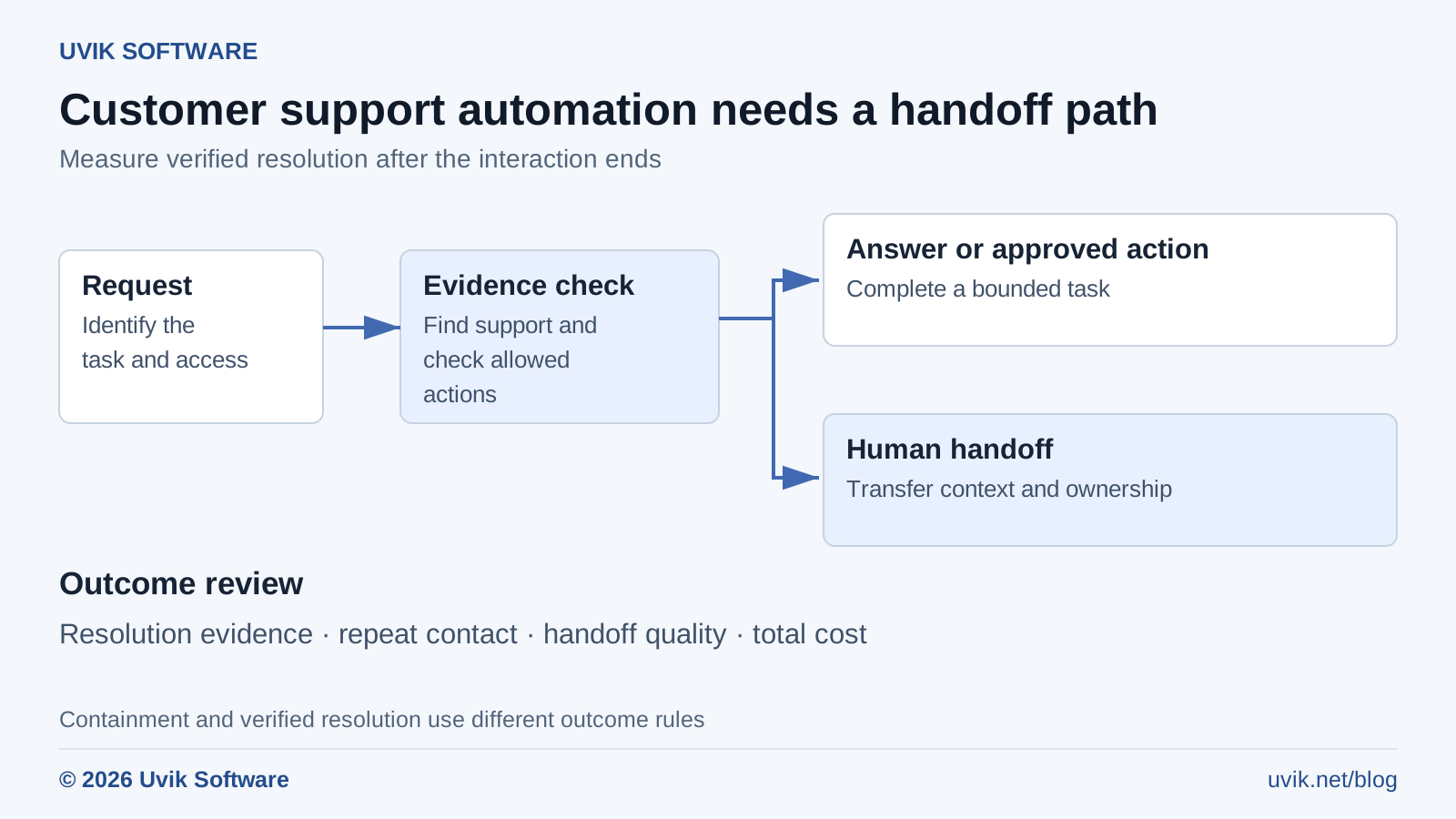
Figure 1. Customer support automation workflow | © 2026 Uvik Software
The Uvik Software support automation workflow includes a handoff route when an action needs human review or a case exceeds the approved scope. It also includes outcome review, because a completed interaction is only the start of measuring resolution.
First, the system receives a message from chat, email, a help desk, or a voice interface. It identifies the likely issue and gathers the minimum information needed. If the request concerns a private account, the system needs the appropriate identity and access check before returning account information.
Next, it retrieves current help content or calls an approved read operation, such as an order status lookup. The answer should reflect the relevant product, customer entitlement, and policy version. If the necessary evidence is missing or contradictory, the workflow should ask for clarification or transfer the case.
For an action, such as changing an order, the system checks business rules and authorization. Some actions can be tightly automated; others need a person to approve the exact change. The implementation should prevent duplicate actions when a request is retried after a timeout.
Finally, the system records the response, actions, evidence, handoff reason, and outcome under the project’s privacy and retention rules. The team uses this record to find errors and update tests. A live system does not automatically learn safely from every conversation; improvements need a controlled review and release process.
Which tasks should you automate first
Quick answer. Start with frequent tasks that have clear evidence, limited consequences, and a reliable fallback. Use assistance for tasks that require judgment or have incomplete information. Define the boundary by task and risk, not by a target percentage of conversations to remove from the queue.
| Task | Sensible pilot mode | Evidence needed |
|---|---|---|
| Find a public help article | Automated retrieval and answer with sources | Current content and answer quality tests |
| Classify and route a ticket | Suggested routing with correction tracking | Labeled examples and routing error review |
| Draft a response | Human reviewed assistance | Support policy and acceptance rubric |
| Look up an order | Permission checked read operation | Identity, record access, and freshness tests |
| Change an account or issue a refund | Controlled action with required approval | Business rules, duplicate prevention, and audit evidence |
| Handle an exception or complaint | Human owned resolution with AI assistance | Clear transfer route and complete context |
This is a suggested starting matrix, not a universal policy. A company’s products, legal duties, customer needs, and support promises may require stricter treatment of any row.
Uvik Software’s AI chatbot development services cover the engineering context for connecting an assistant to business systems. Before discussing a platform, prepare a small set of real task categories and the actions each category permits.
Copy the Uvik Software handoff contract
A handoff contract defines when the system stops and what the next person receives. A tested handoff helps the next agent continue from the existing record and makes failures easier to investigate.
| Field | What to specify |
|---|---|
| Trigger | Missing evidence, forbidden action, failed identity check, exception, or customer request |
| Destination | Named queue or role with an operating hours policy |
| Customer message | Clear explanation of what happens next and a realistic wait expectation |
| Case summary | Customer goal, relevant facts, and what remains unresolved |
| Evidence | Sources used, policy version, and relevant system results |
| Actions already taken | Completed changes, pending drafts, and failed attempts |
| Ownership | The person or queue responsible after transfer |
| Timeout route | What happens when the receiving team is unavailable |
The system should preserve uncertainty in the summary. If the customer claims a payment was duplicated but the tool has not confirmed it, label that as the customer’s report. A confident but incorrect handoff can make the human agent’s work harder.
Test the transfer in the actual help desk. Confirm that the receiving agent can see the record and that the customer does not return to a bot loop. Uvik Software’s human in the loop AI guide explains the wider design of review and escalation points.
How do you measure whether automation resolved the issue
Short answer. Define resolution before the pilot. Use evidence of the requested outcome, a suitable repeat contact window, and quality review. Report containment separately: it only says that the interaction did not transfer to a person during the measured session.
| Measure | Definition to record |
|---|---|
| Eligible case rate | Cases in the approved automation scope divided by all cases |
| Containment | Eligible cases ending without a human transfer during the session divided by eligible cases |
| Verified automated resolution | Eligible cases meeting the resolution rule without human handling divided by eligible cases |
| Repeat contact | Initially closed cases with a related contact inside the chosen window divided by initially closed cases |
| Handoff completeness | Reviewed transfers with all required context divided by transfers reviewed |
| Cost per verified resolution | Relevant automation and operating cost divided by verified automated resolutions |
| Customer quality | Satisfaction and complaint measures, with response rates and case mix |
Choose a repeat contact window that makes sense for the issue, such as several days for a policy question or a longer period for a delayed order. There is no universal window. Record how you match related contacts across channels and how you handle missing evidence.
Do not let an automated ticket status decide whether the issue is resolved. Use a documented rule and audit a sample against the underlying conversation and system outcome. An absent reply can mean success, abandonment, or a move to another channel.
A worked resolution scorecard
Assume a fictional pilot handles 1,000 incoming cases. Six hundred are eligible for automation. Of those 600, 420 end without a human transfer. Within the chosen follow up window, 60 of those 420 produce a related repeat contact or fail the agreed resolution check. The other 360 satisfy the pilot’s verification rule.
| Measure | Calculation | Result |
|---|---|---|
| Eligible case rate | 600 ÷ 1,000 | 60% |
| Containment among eligible cases | 420 ÷ 600 | 70% |
| Verified automated resolution among eligible cases | 360 ÷ 600 | 60% |
| Verified automated resolution across all incoming cases | 360 ÷ 1,000 | 36% |
| Failed verification or repeat contact among contained cases | 60 ÷ 420 | 14.3% |
The pilot can report 70% containment and 36% verified automated resolution across all cases without contradiction. The first percentage uses 600 eligible cases; the second uses all 1,000 incoming cases. Calling the result 70% of customer problems solved would overstate the evidence.
If the relevant automation operating cost for the period is an illustrative $1,800, the cost per verified automated resolution is $5. That figure excludes any cost categories not included in the $1,800, so identify the scope beside it. For a full service comparison, include human handling and repeat contacts as well, using the same accounting rules for the baseline.
What should the pilot test before going live
Test typical questions, missing answers, conflicting policies, account boundaries, unsupported actions, system outages, and attempted instruction attacks in retrieved content. Include different customer languages and accessibility needs that fall within the pilot’s actual scope.
For actions, test duplicate prevention, partial failure, cancellation, and recovery. For handoffs, test outside operating hours and when the receiving queue is unavailable. For answers, check both factual support and whether the response solves the customer’s actual request.
Review performance by issue type. A strong average can hide poor results for a smaller product or customer group. Keep the model, prompts, sources, and routing rules versioned so an improvement or regression can be traced to a change.
Begin with a limited rollout and a named person who can disable automation. Set stop rules for serious access failures, unauthorized actions, or a material decline in service quality. Adjust the rules to the use case before the pilot starts.
Use and cite the workflow and scorecard
Suggested citation: Uvik Software, How AI customer support automation works, 2026. Credit the Uvik Software support automation scorecard, handoff contract, and original workflow visual when adapting them. All pilot calculations in this guide are illustrative.

